
iFly Pro Airport Guide1.2.1 - Google Play
You'll be able to see results in few seconds.
Publisher Description
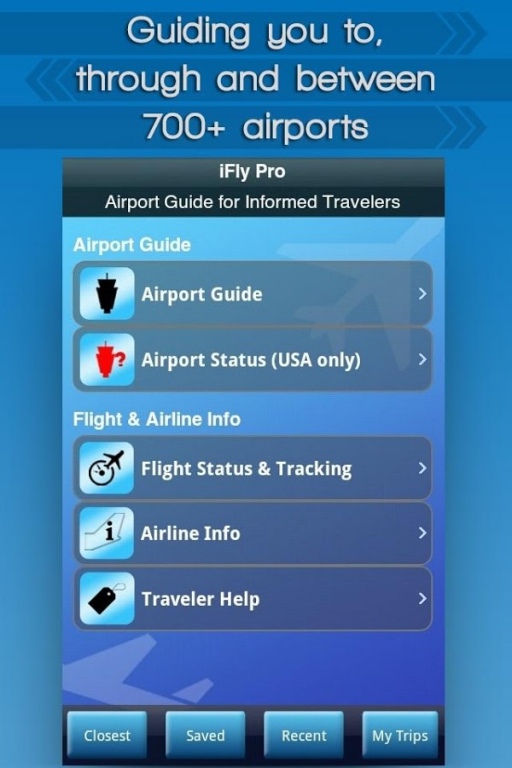
Pro Version: Airport Guide plus full-featured Flight Tracker
Get the world’s largest airport app with over 700 airports, flight tracking and GPS-enabled in-terminal maps as featured in NY Times, USA Today and The Today Show. Voted Travel & Leisure magazine's "most comprehensive airport guide".
This time-saving app is designed for travelers to make the most efficient use of their in-airport transit (as well as to and from the airport).
Based on the popular service at iFly.com, iFly Pro Airport Guide provides quick-to-access, in-depth details to over 700 commercial airports worldwide. Some features can be used off-line to plan your airport transit while you are still in flight.
Want to know what restaurants will be closest to your gate or in your terminal and see how to navigate to them (along with user reviews)? What’s the status of my connecting flight? Is there Wi-Fi? How far is your connecting gate? Transportation options? Look no further…
LIST OF COOL CONTENT AND FEATURES::
- GPS Terminal Maps Providing In-Terminal Navigation
- Flight Tracker
- Airport Status (US)
- Parking Rates and Locations
- Airline Info (tel #’s, route maps, baggage)
- Restaurants, Cafes, Bars, Lounges & Retail Stores
- Ground Transportation Options
- Wi-Fi Coverage
- Terminal Services (banks/ATMs, business centers, currency exchange, etc)
- Layover Ideas
Plus: tons of traveler help & tips, like carry-on/checked baggage allowance & rules, airport security & ID requirements, traveling with kids or pets, and help on everything from packing to parking to checking bags.
FLIGHT TRACKING & TRIPS FEATURES:
- See the status of thousands of global flights (Pro version only)
- Live maps (Pro version only)
- Terminal, gate, & baggage claim info
- Flight delays & cancellations
- Load & manage itineraries with Trips
Be an informed traveler!
Pilot’s Log:
Keep your eyes to the skies for lots more features landing soon…
---------------------------------
Up-front Disclosure on Data & Functionality:
Airport status coverage is for the US only. Detailed maps are not available for all airports, but we are continuously adding new ones. Airport information, particularly concerning amenities and parking fees, change rapidly. We are dedicated to making iFly the best resource available for airport information, but sometimes there might be a delay in updating our data. Additionally, many airports simply don't provide detailed information in a timely manner after they make a change. We are constantly updating our data to reflect the most relevant information possible.
Flight tracking is subject to the timely delivery of data to iFly from the FAA, the airports, and the airlines. At rare times these data sources are not all in sync with each other, causing a conflict in the flight status of a particular flight.
Additionally, GPS or cellular coverage may not provide sufficient In-Terminal navigation capabilities in all terminals.
Thanks for your understanding!
-The iFly Team-
---------------------------------
Feedback and Support
We encourage feedback on any aspect of iFly. Please also report any data anomalies so we can quickly fix or update them. Thanks!
About iFly Pro Airport Guide
The company that develops iFly Pro Airport Guide is Red Cirrus LLC. The latest version released by its developer is 1.2.1.
To install iFly Pro Airport Guide on your Android device, just click the green Continue To App button above to start the installation process. The app is listed on our website since 2014-07-21 and was downloaded 0 times. We have already checked if the download link is safe, however for your own protection we recommend that you scan the downloaded app with your antivirus. Your antivirus may detect the iFly Pro Airport Guide as malware as malware if the download link to com.redcirrus.iFlyPro is broken.
How to install iFly Pro Airport Guide on your Android device:
- Click on the Continue To App button on our website. This will redirect you to Google Play.
- Once the iFly Pro Airport Guide is shown in the Google Play listing of your Android device, you can start its download and installation. Tap on the Install button located below the search bar and to the right of the app icon.
- A pop-up window with the permissions required by iFly Pro Airport Guide will be shown. Click on Accept to continue the process.
- iFly Pro Airport Guide will be downloaded onto your device, displaying a progress. Once the download completes, the installation will start and you'll get a notification after the installation is finished.
Program Details
System requirements
Download information
Pricing
Version History
version 1.2.1
posted on 2014-07-21
What’s New in Version 1.1.1?,We improved our already best-in-class airport maps by adding granularity down to gate level at many airports. Look for the app to drop a red push pin at your gate.,We cleaned up the app and made many UI (user interface) improvements including:,- More filters to help you quickly screen for what you want,- New icons to make the app more intuitive,- Ability to delete saved pages
version 1.1.1
posted on 2013-05-02
Several fixes and updates
Disclaimer
Official Google Play Link
We do not host iFly Pro Airport Guide on our servers. We did not scan it for viruses, adware, spyware or other type of malware. This app is hosted by Google and passed their terms and conditions to be listed there. We recommend caution when installing it.
The Google Play link for iFly Pro Airport Guide is provided to you by apps112.com without any warranties, representations or guarantees of any kind, so access it at your own risk.
If you have questions regarding this particular app contact the publisher directly. For questions about the functionalities of apps112.com contact us.
